Enabling predictive ACC
The predictive ACC (pACC) is a feature that allows the car to adapt its speed based on the road ahead, using data from the navigation system. This feature is normally not available on the Golf, and only on higher-end models. It is possible to enable it on the Golf, but not with just a few check boxes in VCDS.
pACC is a feature that is enabled by the radar module (J428, or block 13) if the appropriate SWaP is installed. SWaP stands for Software-as-a-Product, and is basically a licensing method that is specific to the car. It is the same way how features such as Apple CarPlay or Android Auto are enabled on the navigation system. The difference is that Volkswagen sells licenses to enable Apple CarPlay and such, but does not sell licenses for pACC.
This is where the community comes in, and there are a few sources that provides alternative methods to enable pACC. The most authorative source is VWCoding, but unfortunately it lacks a few details after the initial process. I will try to fill in the gaps where I can. The process consists of two steps. The first step is to enable the pACC SWaP in the radar module, the second step is to code and adapt the feature in other modules.
Enabling SWaP
The SWaP functionality works using public and private keys that is specific to your vehicle. The license, which is called feature-enabling-code (FEC) is generated using the VIN, VCRN and the public key. The community has created a key generator that can generate FEC, but it requires the private key to be known. By flashing the radar module with a specific developer firmware and triggering a specific situation, the public and private keys will change to a known value, and the generator will work. At least, that is how I understand it.
For the next steps, you will need ODIS-E and ODIS-S with online access with
GEKO. That is required to remove component protection from the radar module. I
will also focus on the radar module I have installed, which is the radar with
part number 5Q0 907 572 H (so-called 5Q0 version in many how-to’s).
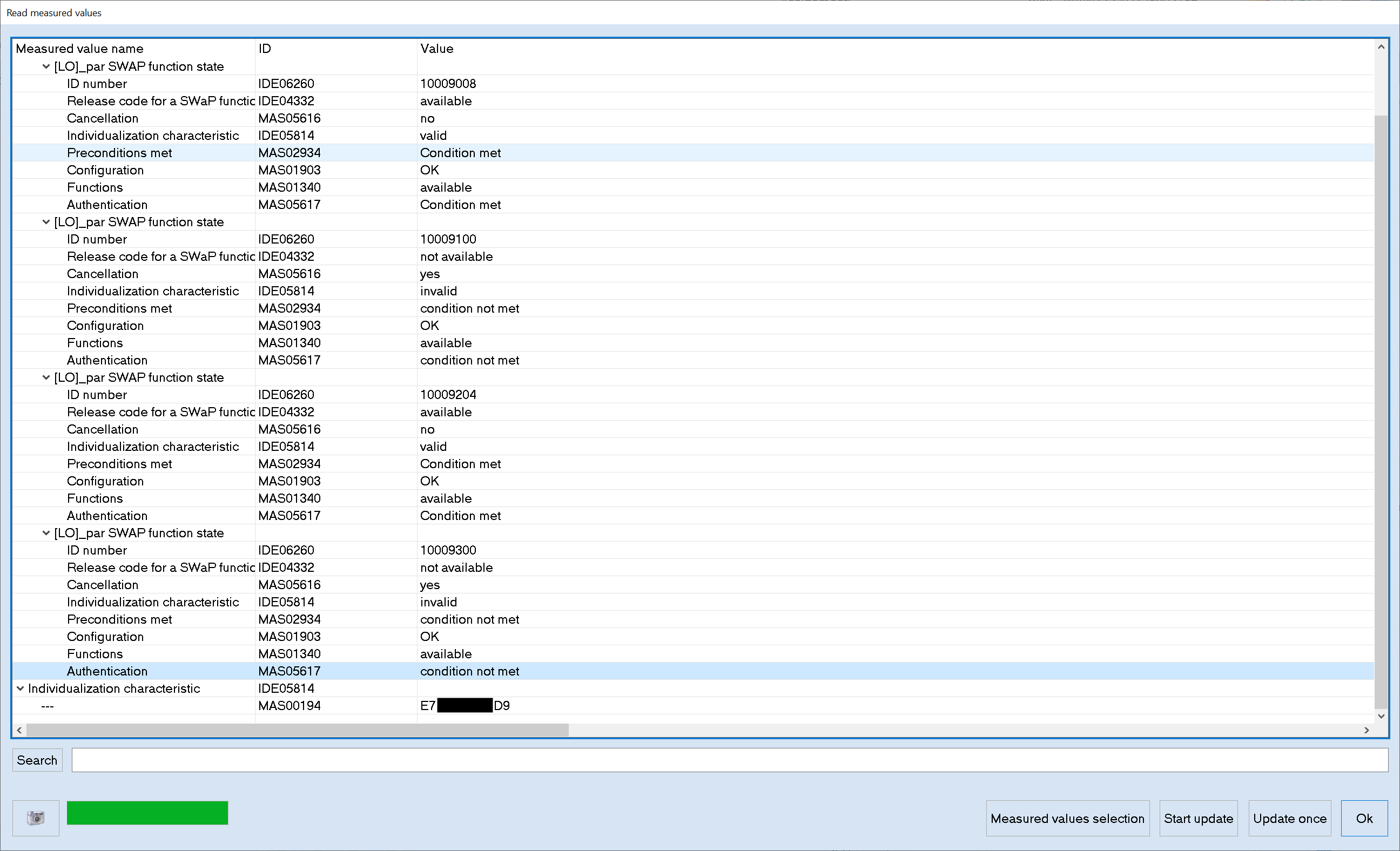
I first checked which ch SWaP codes are currently installed. I used the ‘measuring values’ function in ODIS-S to read the current SWaP codes. There are four codes that can be installed of which the last digit defines what is supported for that group. The higher the number, the more features, the better.
10009001- MRR-Paket 1: ACClow (Basis-ACC) + FrontAssist inkl. CityANB10009002- MRR-Paket 2: ACClow (ACC FTS) + FrontAssist inkl. CityANB10009003- MRR-Paket 3: ACClow (ACC S&G) + FrontAssist inkl. CityANB10009004- MRR-Paket 4: FrontAssist inkl. CityANB10009005- MRR-Paket 5: CityANB10009006- MRR-Paket 6: ACChigh (Basis-ACC) + FrontAssist inkl. CityANB10009007- MRR-Paket 7: ACChigh (ACC FTS) + FrontAssist inkl. CityANB10009008- MRR-Paket 8: ACChigh (ACC S&G) + FrontAssist inkl. CityANB10009101- ACC-Funktionserweiterungs-Paket “predictiveACC”10009102- ACC-Funktionserweiterungs-Paket “StauAssistent”10009103- ACC-Funktionserweiterungs-Paket “predictiveACC & StauAssistent”10009201- AWV-Auspraegung “AWV1,2 - Warnung nur visuell & auditiv”10009202- AWV-Auspraegung “AWV1,2”10009203- AWV-Auspraegung “AWV1,2,3”10009204- AWV-Auspraegung “AWV1,2,3, vFGS10009205- AWV-Auspraegung “AWV1,2,3, vFGS, vRFS“10009300- AWV-Funktionserweiterungs-Paket “Elektronische Parkbremse”10009301- AWV-Funktionserweiterungs-Paket “EmergencyAssist”10009302- AWV-Funktionserweiterungs-Paket “Abbiegeassistent”10009303- AWV-Funktionserweiterungs-Paket “AWV-Gegenverkehr”10009304- AWV-Funktionserweiterungs-Paket “Abbiegeassistent & AWV-Gegenverkehr”10009305- AWV-Funktionserweiterungs-Paket “EmergencyAssist & AWV-Gegenverkehr”10009306- AWV-Funktionserweiterungs-Paket “EmergencyAssist & Abbiegeassistent”10009307- AWV-Funktionserweiterungs-Paket “EmergencyAssist & Abbiegeassistent & AWV-Gegenverkehr”
My car had 10009008, 10009100, 10009204, 10009300 and I decided to
change it to 10009008, 10009103, 10009205 and 10009307, basically the
highest values for each group. That does not necessarily mean that all features
are immediately available, but it is a good starting point.
Then the rest of the procedure is as follows:
- In ODIS-S, start the procedure of removing component protection, even though it is not active. During this procedure, ODIS-S will remove the keys that are currently installed, then upload new ones. When it shows the message ‘sending IKA keys` and ‘sending GKA’ keys, you will have to pull the USB cable. As a happy accident, this will trigger the component protection fault if you read the fault codes. If this does not work, repeat the process.
- Upload the developer firmware. I flashed the firmware from the file
FL_5Q0907572M_X720___S.odxusing ODIS-E. This took about 5 minutes. - Reboot the car, such that the radar module can reset.
- Once it is powered up, remove the component protection using ODIS-S, but this time complete it as normal. Do not reboot the car.
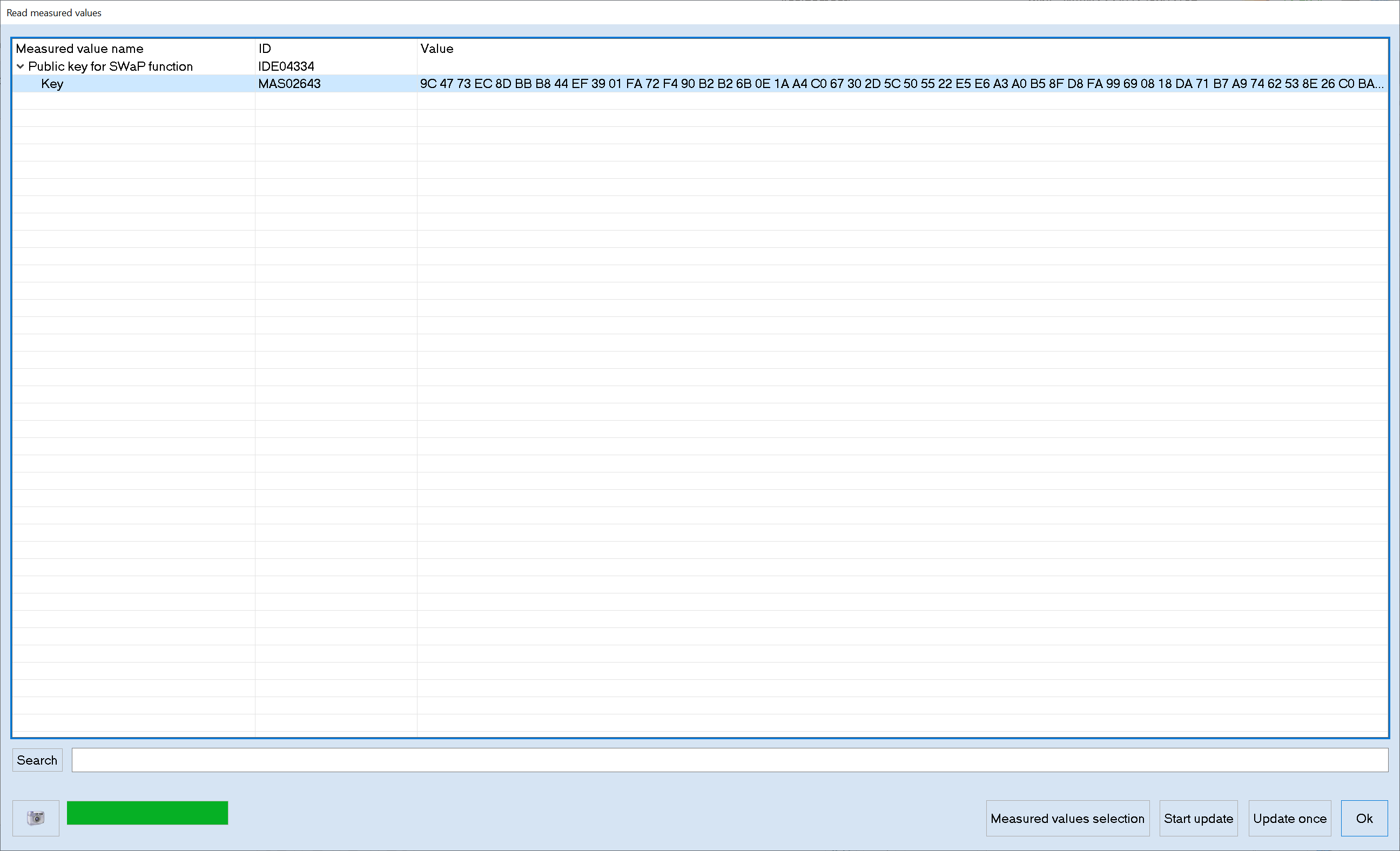
- Read the public key measuring value in ODIS-S. It should start with
9C 47 73 ... The first time I did this, it was not the correct value. We then realized that rebooting the car is mandatory, probably because that is when the keys are loaded by the radar module.
- Find the Vehicle Component Registration Number (VCRN). In ODIS-S this is called the ‘Individualizing Characteristic’.
- Input the VIN, VCRN and the desired SWaP codes in the tool (
afcg.exe) that generates the FEC.
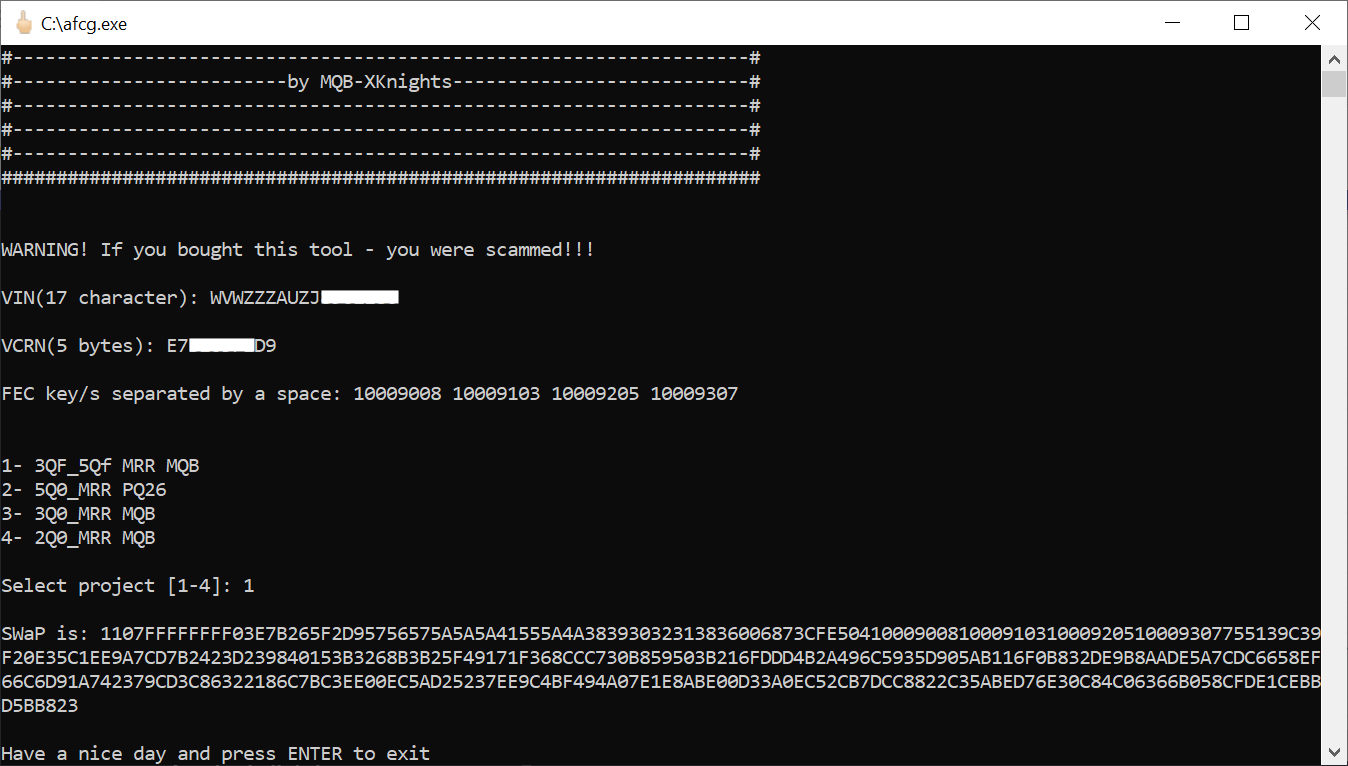
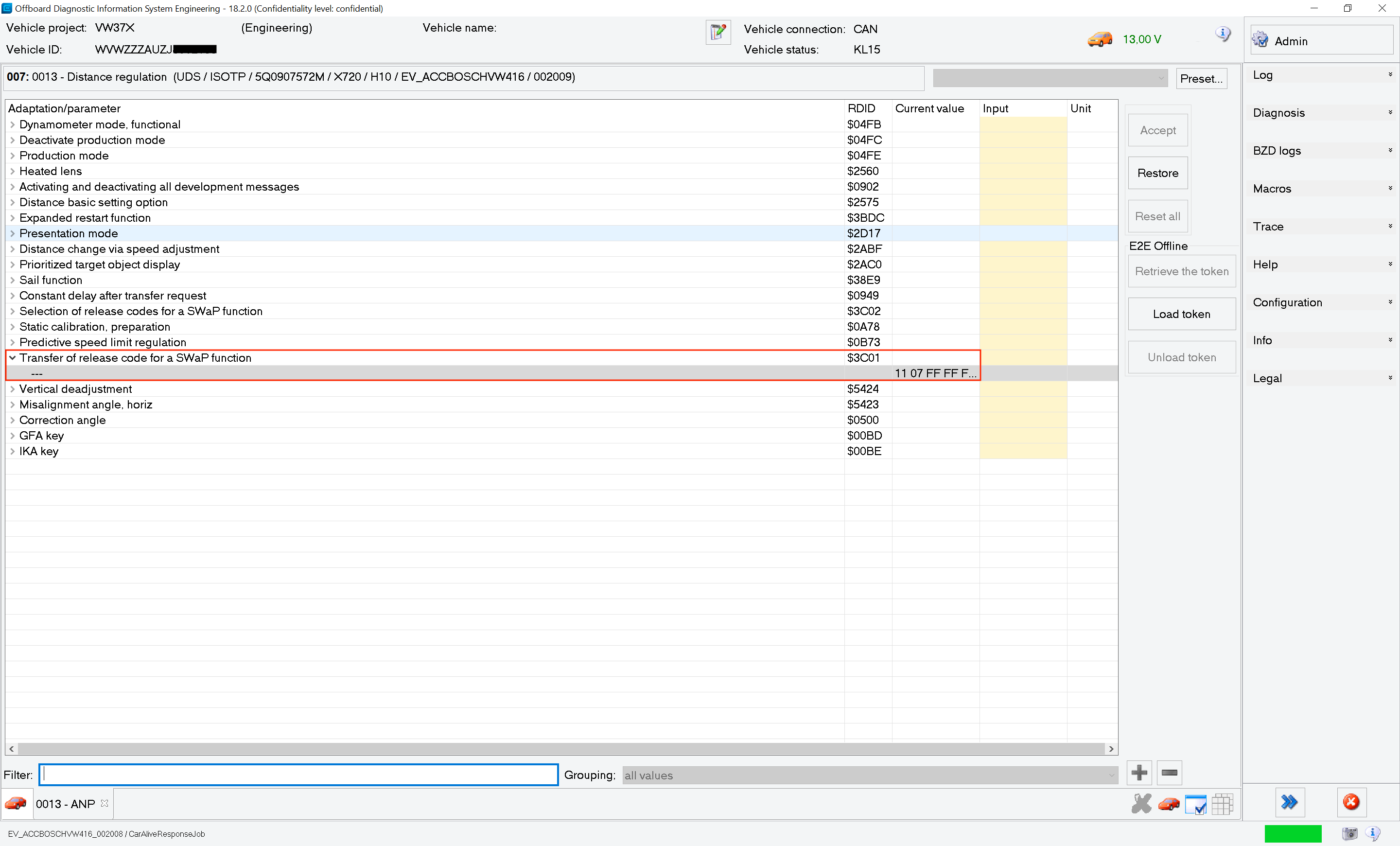
- The generated result must be uploaded to adaption channel (007) ‘Transfer of release code for a SWaP function’, then the basic setting (005) ‘Activation of a SWaP function’ must be performed to enable the SWaP.
- Check the installed SWaP codes again to see if they are all enabled and if their conditions are met.
- Flash the proper firmware for the radar module using ODIS-E. I used the file
FL_5Q0907572S_0780___S.odxto flash the radar module to the latest availalble firmware. - Upload the parameter set using ODIS-E. I used
DA_013_7200_5G0_V309_17_VW370A1RDW.xmlandARBEITS_DATEI_DSDL2.xmlwhich are specific for the Golf 7 Facelift with the radar module in the grill. In ODIS-E you have to select the last file, not the first one. I did not realize this, so I initially downgrade to an older firmware to rule out software version issues, only to find out that I simply used the wrong file. - Restore the coding and adaptions from a backup. The next section will address the remaining faults.
Coding the car
The steps below are applicable to my car, which already came with ACC (high), traffic jam assist and probably emergency assist too. Additional steps are necessary if your car does not have ACC.
Now that the radar module is updated, it still needs to be coded properly. The first thing is to is to get rid of some of the faults related to the new SWaPs.
                Address 13: Auto Dist. Reg       Labels: 5Q0-907-572-V2.clb
Control Module Part Number: 5Q0 907 572 R    HW: 5Q0 907 572 H
  Component and/or Version: ACC BOSCH MQB H10 0771
           Software Coding: 7D0067C155FFC728949C810580400600000000000000000000
            Work Shop Code: WSC 12345 123 12345
              ASAM Dataset: EV_ACCBOSCHVW416 003014 (VW37)
                       ROD: EV_ACCBOSCHVW416_003_VW37.rod
                      VCID: 46D55605582413EAF57-8012
3 Faults Found:

201218 - Control Module Incorrectly Coded
          U1014 00 [00001001] - -
          [FAULT_CODING2SWAP_GRP_ACC_EXTS]
          Confirmed - Tested Since Memory Clear
             Freeze Frame:
                    Fault Priority: 4
                    Fault Frequency: 1
                    Reset counter: 15
                    Mileage: 78427 km
                    Date: 2025.07.13
                    Time: 17:51:29

                    Control Module temperature: 46 ∞C
                    Voltage terminal 15-Voltage: 12.1 V
                    Vehicle speed: 0.00 m/s
                    Longitudinal acceleration: 0.00 m/s≤
                    Adaptive distance regulation: status: ACC_irreversible error

201219 - Control Module Incorrectly Coded
          U1014 00 [00001001] - -
          [FAULT_CODING2SWAP_GRP_AWV_TYPE]
          Confirmed - Tested Since Memory Clear
             Freeze Frame:
                    Fault Priority: 4
                    Fault Frequency: 1
                    Reset counter: 15
                    Mileage: 78427 km
                    Date: 2025.07.13
                    Time: 17:51:29

                    Control Module temperature: 46 ∞C
                    Voltage terminal 15-Voltage: 12.1 V
                    Vehicle speed: 0.00 m/s
                    Longitudinal acceleration: 0.00 m/s≤
                    Adaptive distance regulation: status: ACC_irreversible error

201220 - Control Module Incorrectly Coded
          U1014 00 [00001001] - -
          [FAULT_CODING2SWAP_GRP_AWV_EXTS]
          Confirmed - Tested Since Memory Clear
             Freeze Frame:
                    Fault Priority: 4
                    Fault Frequency: 1
                    Reset counter: 15
                    Mileage: 78427 km
                    Date: 2025.07.13
                    Time: 17:51:29

                    Control Module temperature: 46 ∞C
                    Voltage terminal 15-Voltage: 12.1 V
                    Vehicle speed: 0.00 m/s
                    Longitudinal acceleration: 0.00 m/s≤
                    Adaptive distance regulation: status: ACC_irreversible error
The above fault codes indicate that the SWaP codes are properly loaded, but not coded. In the radar module, I needed to ‘confirm’ which SWaP codes are installed as part of the long coding. There are three faults in my case, because three of the four SWaP codes were changed. The fault number indicates which SWaP code is not confirmed correctly.
- 201218 - mismatch of
1000900xSWaP code - 201218 - mismatch of
1000910xSWaP code - 201219 - mismatch of
1000920xSWaP code - 201220 - mismatch of
1000930xSWaP code
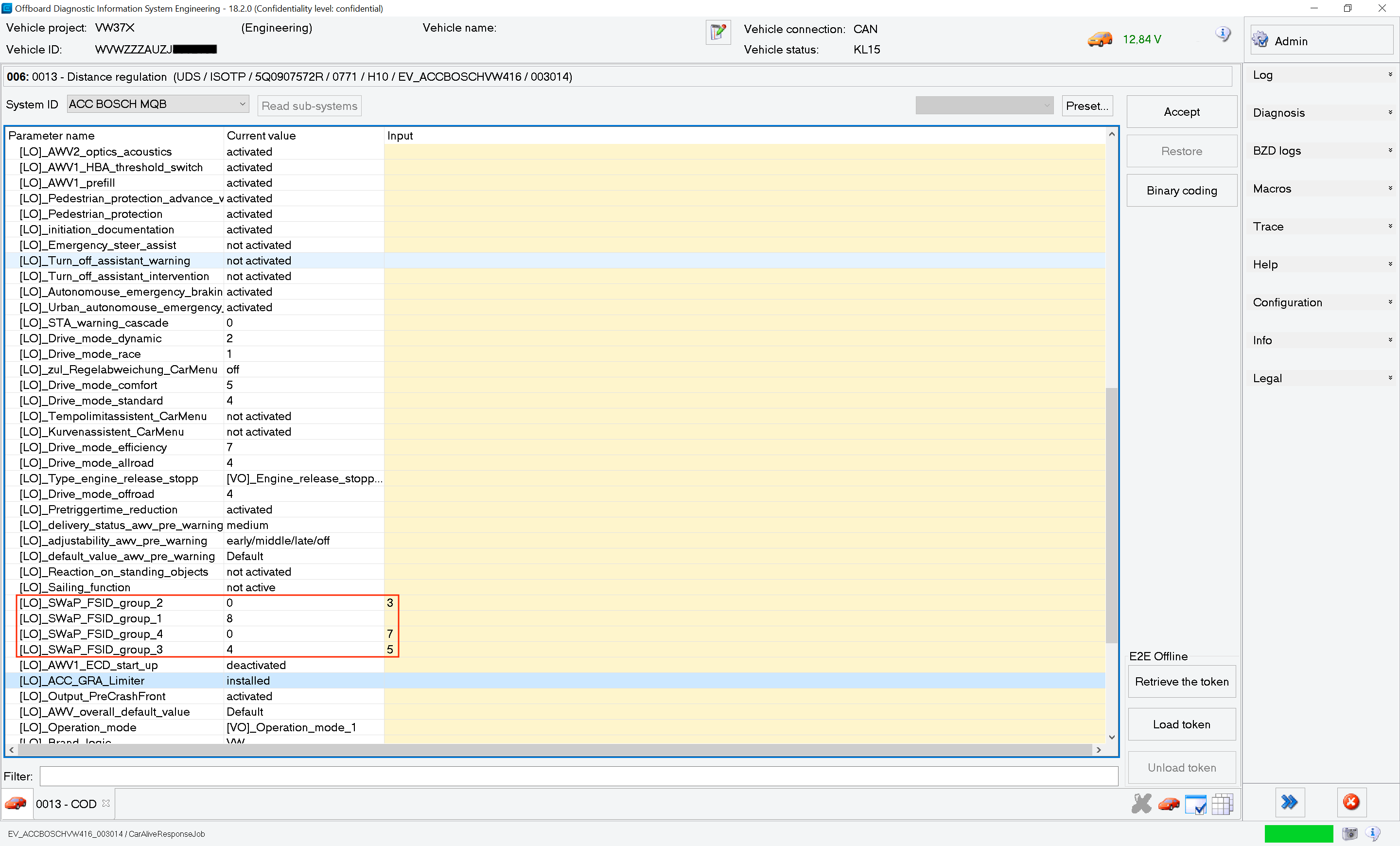
The solve these errors, I used ODIS-E to code the radar module. Find the
field [LO]_SWaP_FSID_group_x and set the value to the last digit of the new
SWaP code. For example, I had to change [LO]_SWaP_FSID_group_2 to 3 because
I activated SWaP code 10009103, which has the last digit 3.
The last step is to properly activate the pACC feature in the radar module. I used VCDS to do this.
- Go to module 13-Auto Distance Regulation
- Use the security access login code 20103.
- Go to coding.
- Change byte 1, bit 1 and enable (
traffic_sign_detection). - Change byte 2, bit 3 and enable (
Speed_limit_assistent). - Change byte 2, bit 4 and enable (
Curve_assistent). - Change byte 3, bit 6 and enable (
Front_camera). - Change byte 9, bit 0 and enable (
Tempolimitassistent_CarMenu). - Change byte 9, bit 1 and enable (
Kurvenassistent_CarMenu). - Change byte 11, bit 5 and enable (
Reaction_On_Standing_Objects). - Change byte 21, bit 0-1 to
01. - Change byte 21, bit 2-3 to
08. - Change byte 21, bit 4-5 to
10. - Change byte 21, bit 6-7 to
80. - Go to adaptions.
- Change the value of
IDE05815-Sail functiontoActivate. - Change the value of
Prioritized target object displaytoOn. -
Change the value of
IDE12516-Predictive speed limit regulationtoactivated. - Go to module 5F-Information Electronics.
- Go to adaptions.
- Change the value of
ENG122227-ENG125823-Car_Function_Adaptations_Gen2-menu_display_Curve_Assisttoactivated. - Change the value of
ENG122227-ENG125824-Car_Function_Adaptations_Gen2-menu_display_Curve_Assist_over_threshold_hightoactivated.
I noticed that I was not able to change the distance setting in the ACC menu anymore. It seems that the firmware update changed this, but it can be fixed easily.
- Go to module 13-Auto Distance Regulation
- Use the security access login code 20103.
- Go to adaptions.
- Change the value of
IDE09564-Distance change via speed adjustmenttoOn.
The final coding is 7D017FE155FFC728979F812583570600000000000099000000.
Test drive
After coding, I gave it a test drive, and it was working as expected. The car notified me when it of speed changes or when it has to slow down for a junction or a roundabout. I think it is a great addition to the car. Before doing this myself, I asked around to see if someone could do this for me, given that you need ODIS-S with online access. I will say it is not worth that much money I was quoted, so I am glad I did it myself.
Autoscan
I created another autoscan after all the changes, although I did flash the
radar module from index R to index S. You can find the autoscan
here.